Widget Plus Window API
The Widget Plus Window API exposes public functions that can be called to setup or make configuration changes to the widgets on the page.
Functions
initAllWidgets
Initializes all widgets on the current page.
Example Usage
window.okeWidgetApi.initAllWidgets();
initWidget
Initializes or reinitializes a particular widget.
Example Usage
const widgetElement = document.querySelector('[data-oke-widget]');
window.okeWidgetApi.initWidget(widgetElement);
Parameters
| Parameter | Description | Value Type | Supported Values | Required |
|---|---|---|---|---|
widgetElement | The widget HTMLElement which will be initialized. | HTMLElement | – | ✅ |
forceReinitialization | Determines whether or not to force the widget to reinitialize if it has already been initialized. | boolean | true, false | – |
setProduct
Sets a widget to 'product' mode and to only show review data for the specified product.
Example Usage
const widgetElement = document.querySelector('[data-oke-widget]');
window.okeWidgetApi.setProduct(widgetElement, 'shopify-7551554945263');
Parameters
| Parameter | Description | Value Type | Supported Values | Required |
|---|---|---|---|---|
widgetElement | The widget HTMLElement which will be set with a particular product’s data. | HTMLElement | ✅ | |
productId | Sets the widget in 'product' mode with only reviews data for the specified product. | string | Any valid Product ID in the format shopify-{product_id} e.g. shopify-1234567. | ✅ |
setGroup
Sets a widget to 'group' mode and to only show review data for the specified group.
Example Usage
const widgetElement = document.querySelector('[data-oke-widget]');
window.okeWidgetApi.setGroup(
    widgetElement,
    'd06b2294-7f17-48fe-9fd6-155e8cb07a54'
);
Parameters
| Parameter | Description | Value Type | Supported Values | Required |
|---|---|---|---|---|
widgetElement | The widget/target HTMLElement which will be set with a particular product’s data. | HTMLElement | ✅ | |
groupId | Sets the widget in 'group' mode with only reviews data for the specified product group. | string | Any valid Group ID. Where can I find a Group ID? | ✅ |
How to Find a Group ID
- Open Okendo Admin.
- Navigate to Groups (Reviews > Groups).
- Select the Group you would like to use for your widget.
- Look in the URL for the group page and you will see a GUID at the end of the URL. This is the Group ID.
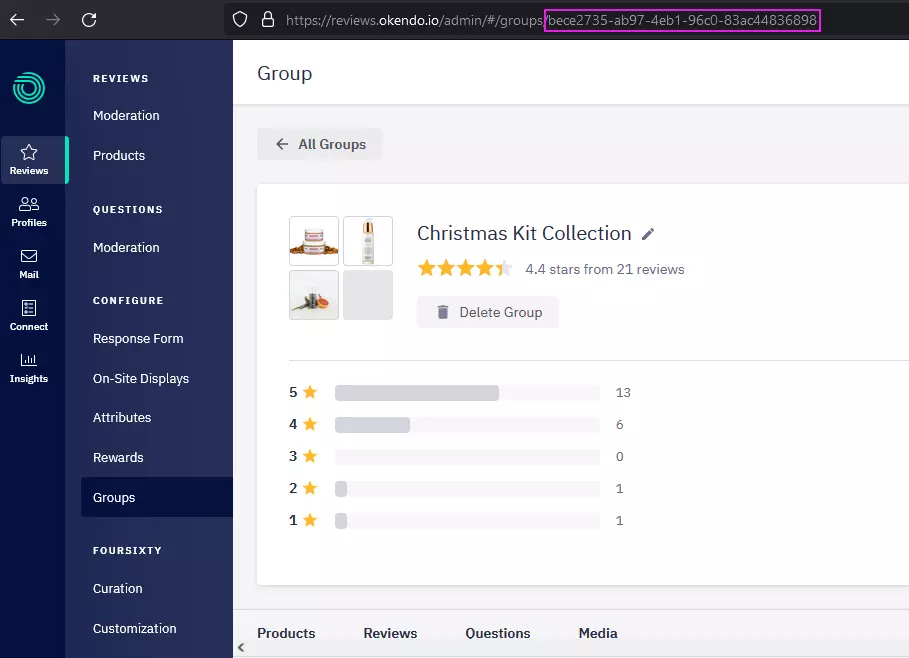
Group ID is located in the browser address bar at the end of the URL.
setWidgetLocale
Sets the widget locale and/or locale variant for the widgets to use for translation purposes.
Example Usage
window.okeWidgetApi.setWidgetLocale('fr');
Parameters
| Parameter | Description | Value Type | Supported Values |
|---|---|---|---|
locale (required) | The locale code for the language you want the widget to use. | string | bg (Bulgarian)cs (Czech)da (Danish)el (Greek)es (Spanish)fi (Finnish)fr (French)hi (Hindi)hr (Croatian)hu (Hungarian)id (Indonesian)it (Italian)ja (Japanese)ko (Korean)lt (Lithuanian)ms (Malay)nb (Norwegian, Bokmål)nl (Dutch)pl (Polish)pt-br (Portuguese, Brazil)pt-pt (Portuguese, Portugal)ro (Romanian)ru (Russian)sk (Slovak)sl (Slovenian)sr (Serbian)sv (Swedish)th (Thai)tr (Turkish)uk (Ukrainian)vi (Vietnamese)zh-cn (Chinese, simplified)zh-tw (Chinese, traditional) |
variant (optional) | The variant code for the language you want the widget to use. | string | formal (default) | informal Currently only supported for the locale de. |
Custom Initialization
If our standard widget initialization pattern doesn't work correctly for your application, you may need to manually re-initialize the widget(s).
Manually Initialize a Widget
A common practice is to initialize the widget via the Window API by placing a script block or file at the base of your HTML document.
You are then able to watch the document.readyState lifecycle and initialise widgets using the window.okeWidgetApi.
<script type="text/javascript">
((document, window) => {
    const reviewsWidgetHolder = document.querySelector('[data-oke-widget]');
    if (reviewsWidgetHolder) {
        const handleDocumentLoaded = function (e) {
            if (window.okeWidgetApi) {
                window.okeWidgetApi.initWidget(reviewsWidgetHolder, true);
            }
        }

        if (document.readyState !== 'interactive' && document.readyState !== 'complete') {
            document.addEventListener('readystatechange', () => {
                handleDocumentLoaded();
            }, { once: true });
        }
        else {
            handleDocumentLoaded();
        }
    }
})(document, window);
</script>
Overriding The Product Details URL - Stores With Shopify Markets / Custom Domains / Headless
We give merchants the ability to override the way their product detail URLs are generated by the Reviews Widget.
A common use-case for this functionality would be in the event a store is using Shopify Markets, Custom Domains, a Headless implementation.
In your theme or a custom html/liquid block you can supply a product URL formatter function on the window object which the reviews widget will use when generating links to products.
Note: It is recommended to place this snippet in the <head> of your site above the {{ content_for_header }}.
Example Markets Usage When Using Shopify Translate and Adapt Style Sub-Folders for <market>-<locale> e.g. https://www.store-domain.com/ja-ja/
<script type="text/javascript">
    window.okeProductUrlFormatter = (product) => {
        if (
            product &&
            window?.Shopify?.routes?.root?.length &&
            window?.Shopify?.routes?.root !== '/'
        ) {
            return (
                window.Shopify.routes.root +
                'products/' +
                product.productHandle +
                '/?id=' +
                product.productId +
                (product.variantId ? '&variantId=' + product.variantId : '')
            );
        }
    };
</script>
Example Markets Usage
<script type="text/javascript">
    window.okeProductUrlFormatter = (product) => {
        // Retrieve current Shopify locale
        const locale = window.Shopify.locale || 'en';

        // Base URL for each locale
        // You could use window.Shopify.routes.root
        let baseUrl;

        // Switch statement to handle different locales
        switch (locale) {
            case 'en': // Default English market
                baseUrl = 'https://www.my-store.com';
                break;
            case 'ja': // Japanese market
                baseUrl = 'https://www.my-store.co.jp';
                break;
            case 'au': // Australian market
                baseUrl = 'https://www.my-store.com.au';
                break;
            case 'zh': // Chinese market
                baseUrl = 'https://www.my-store.cn';
                break;
            case 'de': // German market
                baseUrl = 'https://www.my-store.de';
                break;
            // Add more cases for other locales as needed
            default: // Fallback for unsupported locales
                baseUrl = 'https://www.my-store.com';
                break;
        }

        // Construct the product URL
        const productUrl = `${baseUrl}/products/${product.productHandle}/?id=${product.productId}`;

        // Include variantId if available
        if (product.variantId) {
            return `${productUrl}&variantId=${product.variantId}`;
        }

        return productUrl;
    };
</script>
Parameters
| Parameter | Description | Value Type | Object Values | Required |
|---|---|---|---|---|
product | This is a JavaScript object passed to your function to provide product information you may use when constructing a product details URL. | object | { productHandle: string, productId: string, variantId: string } | ✅ |
Events
For merchants not using Google Analytics, an oke-analytics-event is raised in conjunction with any of our standard Google Analytics interaction and view events.
You can subscribe to the event and forward it on to other analytics providers like so:
document.addEventListener('oke-analytics-event', (event) => {
    // event.detail contains analytics information properties
    console.log(JSON.stringify(event.detail));
});
event.detail Properties
| Property | Description |
|---|---|
event | The name of the event in snake case |
event_category | 'Okendo' |
event_label | A custom label based on the event or falls back to the product name if not supplied |
event_type | 'interaction' | 'view'interaction – When a user directly interacted with the widget. view – When widget-based time tracking is enabled (see: Tracking widget on-screen time) |
okendo_product | 'reviews' |